Write the script, create images and video, and finish your content in one app with a Vietnamese interface. Pick the workflow that fits your product, review each scene, then export the video.
For Windows · Bring your own AI accounts and credits · Hands-on guidance package available
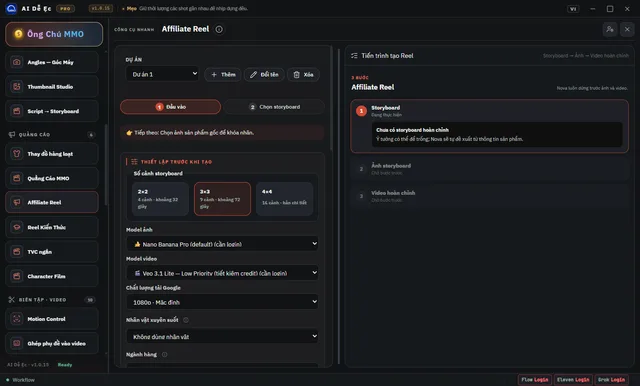
Image 1: Create Video: choose text, first/last frames or a reference image, plus the model and the number of parallel jobs.
Illustrative interface of AI Dễ Ẹc for Windows v1.0.72 · Feature configuration screen, no AI task running.
About
What can AI Dễ Ẹc do?
AI Dễ Ẹc for Windows v2.0.3: create images/videos, product reviews, thumbnails and voice-overs in one Vietnamese-language app. Manage AI accounts, queues and projects, and recover media you've already generated.
Fewer tabs. Focus on making videos for your products.
AI Dễ Ẹc is a Windows app that brings the steps of AI content production into one place: preparing the product, building the script, generating images, generating video, voice-over and finishing the files. Choose the right tool, check each step, then export the content to post on TikTok, Facebook Reels or YouTube Shorts.
This page is updated to match the v2.0.3 release of October 9, 2026. The software automates the operations; AI accounts and credits are prepared separately.
General Goods (Tạp Hóa) — Start With the Right Product Type
Choose the review workflow that fits your product group, such as phone cases, acrylic (mica) items and household goods. Prepare real photos and information about the product, choose a storytelling approach, then continue on to the storyboard, images, video and the final export.
Version 1.0.72 added a default option of up to 10 seconds per clip with Omni Flash in the Phone Case Review, while keeping the 8-second option for older projects. The prompts aim for Vietnamese-language dialogue and smooth continuity between clips; listen to and review the result before posting.
Batch Image and Video Creation — Managed From a Single Queue
Create Image: enter a prompt, add reference images, choose the model, aspect ratio and quantity.
Create Video: choose text-to-video, first-frame image, first/last-frame images or reference images, depending on what the model supports.
Thread count: adjust the level of concurrent processing for Flow right inside Create Image/Create Video. Account limits and provider speed still apply.
Track results: see progress, failed tasks and finished files; handle only what's missing instead of redoing the whole project, where the workflow supports it.
Create Video with reference images and thread count settings — a configuration screen, no AI task has been run.
Batch Create Image in AI Dễ Ẹc — a configuration screen, no AI task has been run.
Food Reviews, Fashion and Affiliate Videos, Scene by Scene
Food Review, Storyboard 2, Household Review, Affiliate Reel and Drama Vip Pro provide step-by-step content workflows. Your reference images, product information and choices are used to build the storyboard before any media is generated.
For workflows with image/video review, you check and pick scenes before moving on. Faces, products and voices need to be checked against the actual files; the tool helps keep things consistent but does not guarantee that every generation will be perfect.
Thumbnail Studio — Finishing Cover Images for Your Content
Use reference images, choose a layout and edit the Vietnamese text to build a thumbnail for a video or product. Save the project to keep editing, and export the image once the layout and content are right.
Voice, Subtitles and Editing in One Toolset
Translate videos, turn spoken audio into subtitles and read on-screen subtitles from the picture.
Text to Speech, voice-over, multi-speaker dialogue and separating vocals from background music.
Tools to remove hardcoded subtitles and image watermarks; results depend on the source, the background and the processing area.
Node-based workflows, a character library and a Prompt Library to organize repetitive work.
Some on-device processing tasks require downloading additional components and storage space. Only use content, voices and images that you have the right to use.
Getting Started: Prepare, Create, Review, Export
Prepare: install the Windows tool, activate it and connect a suitable AI account.
Choose what to do: a product-based quicktool or Create Image/Create Video.
Review the content: check the script, images, product details and dialogue.
Export and check: look at the final file, fix any details that need it, then post it to your channel.
Pick the Right Plan to Get Started
Already used to making AI content? Choose the tool plan to use the software along with setup instructions and support.
Want someone to walk you through hands-on practice? Choose the Tool + hands-on Affiliate guidance combo right in the purchase box. The total updates based on your selection.
Third-party AI accounts, APIs and credits are not included in the tool price. The current sale price and the combo price are shown in the plan selection area; there is no guarantee of views or revenue.
Update 2.0: Accounts, Queue and Recovery
The Account Center organizes sign-ins and provider checks. The queue accepts quicktools and project tools; supported workflows keep the project, media and receipts so you can continue or re-download results you've already generated. Google Vids/Flow checks the account and quota before submitting. Version 2.0.3 fixed the Account Center appearing blank when Google Vids hasn't been linked.
Watermark and Subtitle Processing
Version 2.0.2 fixed downloading/installing the add-on that handles image watermarks and video logos/subtitles, and also fixed the cleaning of reference images before video creation. You need to check the quality of the final file; not every watermark can be handled well.
The interface screenshots in this article are from v1.0.72. The latest changelog reflects version 2.0.3; button positions and options in the current version may differ.
When you buy
What you get
AI Dễ Ẹc for Windows v2.0.3 and the tool's updates
General Goods (Tạp Hóa): review workflows by product group
Food Review, Storyboard 2 and Affiliate Reel
Batch image/video creation, model selection and Flow thread count
Thumbnail Studio: cover images, layouts and Vietnamese text
Video translation, subtitles, voice-over and editing
Save projects, resume what's missing and re-download generated media
Setup and activation guides, with support via Zalo
AI Account Center and quicktool queue
Google Vids/Flow and an add-on for handling watermarks, logos/subtitles
VIP
VIP Content — Exclusive Content
Exclusive VIP content for members only.
A guide to installing, activating and starting your content workflow with AI Dễ Ẹc.
VIP content is locked
Become a VIP member to unlock all the exclusive content and premium features.
Fixed Account Center When No Google Vids Account Is Linked
• Fixed the provider list being empty on machines with no linked Google Vids account.
• The error status bar no longer empties the account list.
• Keeps projects, media, receipts and browser profiles when updating from 2.0.2.
Source: official GitHub Releases v2.0.3.
v2.0.2
Fixed Add-on Installation and Reference Image Cleanup
• Fixed downloading/installing the image watermark and video logo/subtitle packs 1.0.2.
• Fixed reference image cleanup before video creation.
• Old add-ons are updated the next time they are used.
Source: official GitHub Releases v2.0.2.
v2.0.0
Major Update for Vids, Flow, Accounts and the Queue
• Vids/Flow now check accounts and quotas, and support recovering media that was already submitted.
• Improved account/provider rotation and handling when a limit is hit.
• The queue accepts quicktool and project tool jobs, and remembers the project and watermark choices.
• Thumbnails now include Poster AI; improved the Food Review, Household, Fashion and Creative Flow flows.
• Keeps old projects, media, receipts and browser profiles when upgrading from 1.0.81.
Source: official GitHub Releases v2.0.0.
Buy once to keep access and get every update of the product free for as long as it is developed. Each update is dated in the changelog.
Who makes it
Who is behind this product
Ông Chú MMO
AI Operator & Tool Builder
Personally built AI Dễ Ẹc — an all-in-one AI video & image studio for fellow affiliates and content creators. Templates and features are updated continuously.
Feature notes written by our editorial team based on v2.0.3; they are not customer testimonials.
Feature notes
One workflow for many kinds of content
The Tạp Hóa (general goods), Food Review, fashion and thumbnail flows cut repeated setup steps. Results depend on your input images, script and AI accounts, and you still need to review the output before posting.
Feature notes
Clearer accounts and queue
Version 2.0 organizes provider accounts and the quicktool queue. Vids/Flow can check quotas and recover jobs. Version 2.0.3 fixes an empty account list when Google Vids is not linked.
Feature notes
Pick up where you left off
Projects, media, receipts and browser profiles are kept when you update, as described in the release notes. A job that may or may not have been sent still needs checking before you run it again, to avoid spending credits.
Feature notes
What you need to prepare
Requires Windows and an account or API from your provider. The tool includes no credits. Media add-ons are downloaded and installed separately when used; an unsigned installer may trigger a SmartScreen warning, so download it from the official GitHub Releases.
Reviews
Reviews and comments
This product has no reviews yet. If you have used it, you could be the first to share your experience.
Frequently Asked Questions
No. AI Dễ Ẹc organizes and automates the workflow. You prepare an account or API that suits the provider you choose, such as Google Flow/Gemini, Grok, ChatGPT or a voice service. Plans, limits and credits are set by the provider.
The Windows version v2.0.3, released on October 9, 2026. The changelog summarizes the released version; the interface screenshots were taken from v1.0.72, not v2.0.3.
Affiliate videos and reviews of products, food, fashion and household goods; images/videos for shops, thumbnails and short-form content. Choose the right quicktool, supply clear photos and check the storyboard, narration and product before posting.
The release featured here is for Windows. This page does not offer a macOS installer and makes no commitment to a macOS release date.
Workflows that support recovery keep what has already been completed and let you resume what's missing. When the original task data is available, you can re-download media without generating it again. If it isn't clear whether a task was already submitted, check the original project before confirming a re-run, because it may use up credits.
The tool plan includes the software, setup instructions and usage support. The combo adds a hands-on Affiliate guidance package: choosing a content direction, setting up the workflow and practicing with your own product. Prices and the combo total are shown in the plan selection box.
The countdown runs until 00:00 Vietnam time and restarts every day. It is not an automatic price-increase schedule; the price that applies is the one confirmed at checkout.
Open the Library in your website account to see your purchased product information, instructions and the download links provided. When you need help with installation or activation, contact Ông Chú MMO via Zalo using the details on the page.